If you have a favorite K-pop idol, or a K-pop band, you must want to get more videos about your idols for watching several times. For fans from around the world to have interaction with K-pop idols, a Korean video streaming website, V Live, is provided for idols to live stream and interact with fans in real time. On V Live, you can subscribe for your idols' channels and catch the live stream or video updates in time. You can also leave instant comments and click "Like" to have a good interaction with your idols.

EXO is the world-popular K-pop boy band, which debuted in 2012, and is consisted of 8 Korean members and 1 Chinese member. The fanclub of EXO has over 4 million fans from all over the world, which is really popular in many countries, including Asian, Western, and even European areas. EXO also broke many historic records, adding great popularity to the band in both home and abroad.

If you are also a fan of EXO, do you also want to save EXO V Live videos to high 1080 quality on different devices so that you can see your idols at anytime you want? In this blog, you can get the most powerful V Live video downloader to download EXO V Live videos to 1080p on different devices. Now just keep on reading.
Related reading:
Part 1. [Recommendation] VidPaw V Live Video Downloader
VidPaw V Live Video Downloader is the tool that I want to recommend to you for download EXO V Live videos with high quality. It can works greatly on various devices, including Windows, Mac, Android, and iPhone. With VidPaw V Live Video Downloader, users can simply convert the V Live video to different formats and download it with high quality.
For convenient use, VidPaw V Live Video Downloader is designed with simple interface so that users can easily know how to use the tool to download their favorite idols' V Live videos. In the next 3 parts, you will learn the detailed guidance on how to download EXO V Live videos to 1080p on different devices.
Part 2. How to Download EXO V Live Videos to 1080p on Windows/Mac
Download EXO V Live video to 1080p on Windows and Mac is simple. You only need the URL of the V Live video and the help of VidPaw V Live Video Downloader. Within several clicks, it can be successfully downloaded. See how it works now!
STEP 1. Copy the URL of EXO V Live Video
You can go to V Live website and search for EXO channel to reach the video you want to download. After you open the video page, copy its URL from address bar. Or you can also go to V Live channel on YouTube and get the URL of the EXO YouTube V Live video.

STEP 2. Paste URL to VidPaw V Live Video Downloader
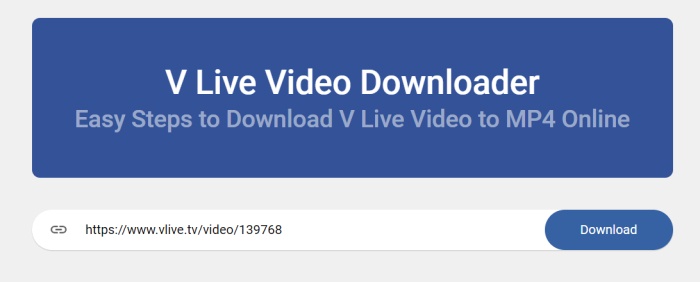
When you get the URL of EXO V Live video, now you should go to VidPaw V Live Video Download and paste the link to the downloader bar. Then click "Download" button.
STEP 3. Download EXO V Live Video
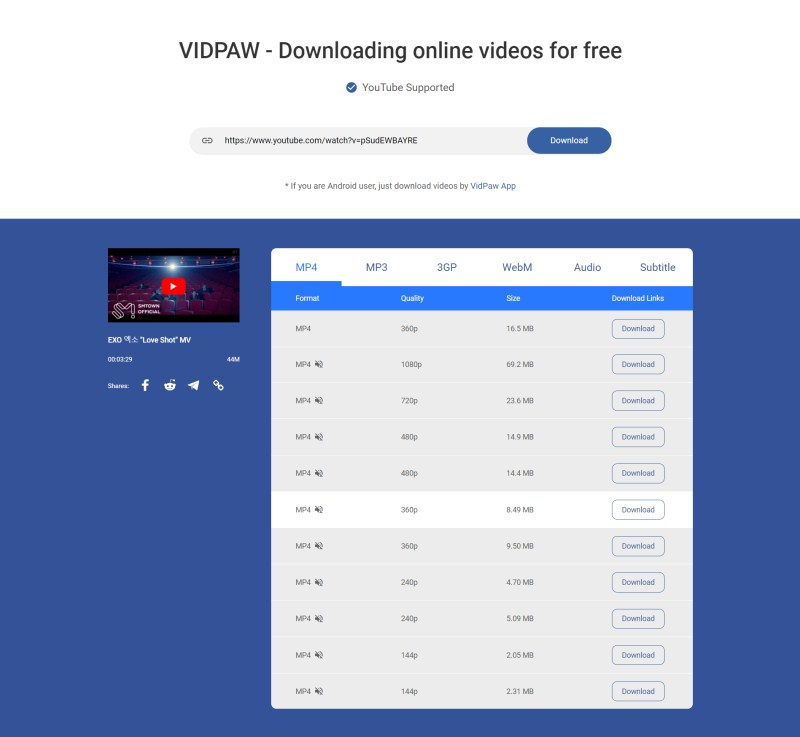
After VidPaw V Live Video Downloader shows you the output format and quality, you can choose to save the video in 1080p on your computer with your favorite format. Hit "Download" and start downloading EXO V Live video now.
STEP 4. Click Download Again
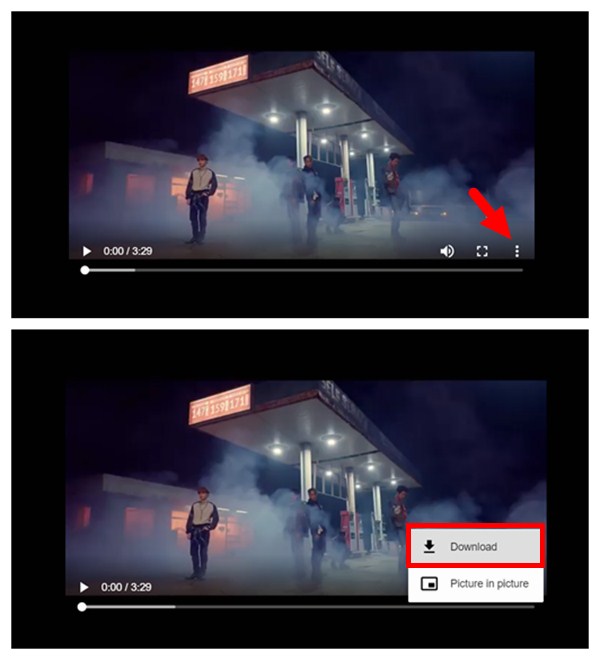
If VidPaw shows you a pop-up window and play the EXO V Live video for you, now please click the three-dots icon and hit "Download" to save EXO V Live video.
Part 3. How to Download EXO V Live Videos to 1080p on Android
If you are using an Android device, you can also easily download EXO V Live video to it with VidPaw V Live Video Downloader, because this tool is compatible with Android device as well.
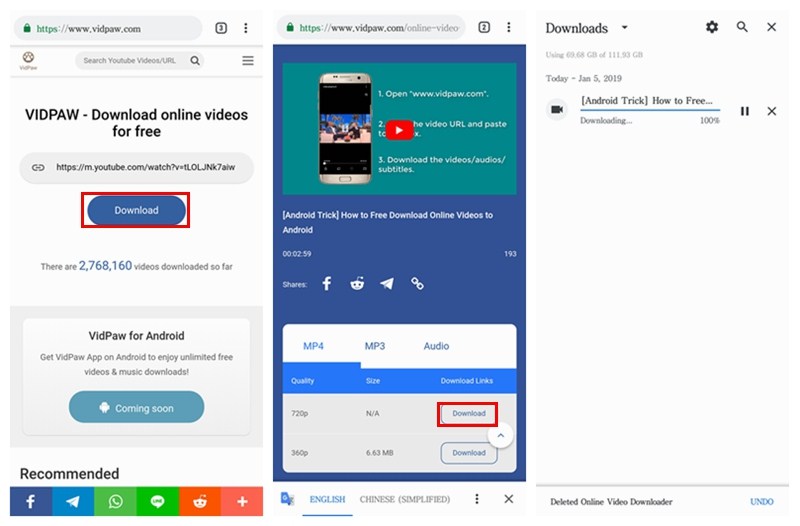
STEP 1. Visit V Live website or YouTube V Live channel in the browser of your Android device to reach the EXO V Live video you want to download. When you click into the video page, copy the URL of the video directly.
STEP 2. Open a new page and go to VidPaw V Live Video Downloader now. Then simply paste the URL of the EXO V Live video to the bar, and click on "Download".
STEP 3. When VidPaw V Live Video Downloader gives the output selections for you to choose, select 1080p in your favorite format, and hit "Download" button to download the EXO V Live video to 1080p.
Part 4. How to Download EXO V Live Videos to 1080p on iPhone
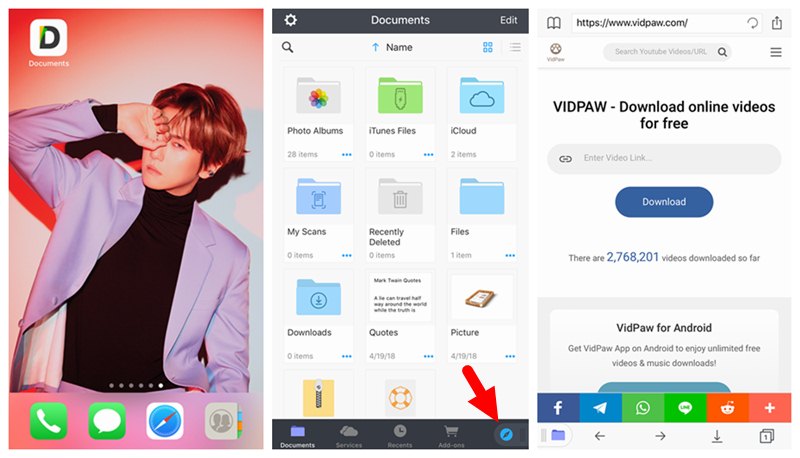
Using VidPaw V Live Video Downloader on iPhone has a little difference. You need to use the certain browser - Documents - to download your favorite EXO V Live video. How? Check it below.
STEP 1. At first, go to App Store and search for Documents app. Install it to your iPhone directly.
STEP 2. Go to V Live website or YouTube V Live channel to copy the URL of EXO V Live video.
STEP 3. Open Documents app and go to VidPaw V Live Video Downloader with its browser. Then paste the URL to the download bar and click "Download" to convert the video.
STEP 4. When you see the output selections, choose 1080p and the format you like, then hit "Download" to download the EXO V Live video in the folder of Documents.
By getting the VidPaw V Live Video Downloader, you can download more idols' V Live videos to 1080p for watching offline. It does great help to get your favorite idol's latest videos, so that you can play them at anytime and anywhere you want. You really should not miss VidPaw V Live Video Downloader if you also want to collect your idol's videos!